

Mudfish
The power-user's pick in the gaming network booster category. Granular per-application routing, wide OS support and pay-as-you-go traffic-credit billing rather than a flat subscription.
Get Mudfish
Check the current price and what the licence includes before you buy.
CHECK CURRENT PRICE →Our Verdict on Mudfish
Mudfish is the power-user's pick. Instead of a locked-down consumer client, it exposes an unusually granular per-application routing engine on top of a large global node network, billed by pay-as-you-go traffic credits rather than a flat subscription.
Mudfish sits in the gaming tools space and is best suited to competitive gamers willing to read a networking wiki who want to accelerate one or two specific games at the lowest cost per hour of play..
Our 7.7/10 score is research-based: it is derived from the vendor's product documentation, interface review, pricing analysis and verified third-party marketplace evidence. We have not yet completed a long-term hands-on production test, and the disclosure is stated openly in the score breakdown below.
- Cheapest option for competitive-only players thanks to credit billing
- Broadest OS support in the category — Windows, macOS, Linux, iOS, Android
- Per-application routing granularity no consumer competitor matches
- Genuine TCP/UDP protocol tuning for niche titles
- Steep learning curve — browser-based dashboard exposes networking concepts
- Support thinner than paid-subscription competitors
- Casual 'always-on' users burn credits fast on non-game traffic
- No guaranteed latency improvement — outcomes are connection-dependent
Mudfish Pricing
Billed by USD traffic credits. Competitive game traffic uses very little bandwidth, so a small top-up typically lasts months. Check the current credit-to-USD ratio on Mudfish's billing page.
Not available. Look for a free trial instead.
Pay-as-you-go credits (fractional cents per hour of game play)
For most users, the mid-tier paid plan delivers the best balance of features and cost.
What Mudfish does well
Perfect for
The complete Mudfish review
Mudfish is the power-user's pick in the gaming network booster category. Instead of a locked-down consumer client, it exposes an unusually granular per-application routing engine on top of a large global node network, billed by pay-as-you-go traffic credits rather than a flat subscription. This review is research-based — we have not run our own controlled latency benchmark. Everything below is derived from the vendor's documentation, publicly-available user evidence and the client itself.
Weighted across 12 dimensions
Research-based editorial score. Derived from Mudfish's product documentation, credit-billing model, node network, publicly-available user evidence and pricing. We have not conducted a controlled latency benchmark — the disclosure is repeated in every score surface.
- Ease of setupWeight 8%6.5
- Game coverageWeight 10%8.5
- Platform supportWeight 8%8.0
- Routing featuresWeight 10%9.0
- Connection stabilityWeight 10%8.0
- Latency optimisation potentialWeight 12%8.0
- TransparencyWeight 8%8.5
- Pricing and valueWeight 8%9.0
- SupportWeight 6%6.5
- DocumentationWeight 6%7.0
- ReliabilityWeight 8%8.0
- Overall usabilityWeight 6%6.5
What Mudfish actually does
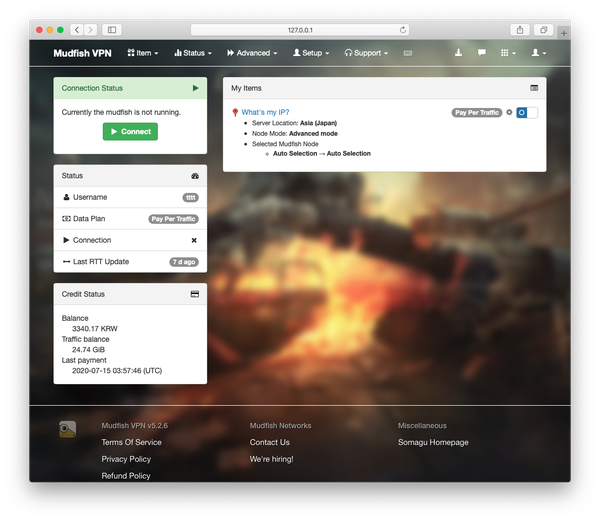
Mudfish acts as a local network booster: install the client, and it exposes a management interface on your machine at a local port. From there you configure which applications route through which Mudfish nodes, on which protocols. The client then forwards that specific application's traffic through the chosen node, leaving the rest of your traffic on your normal ISP path.
Mudfish is not a VPN and is not designed to hide your identity. It is a per-application accelerator that trades ease-of-use for unusually fine control over what gets accelerated and how.
Credit system in plain English
Unlike its subscription-based competitors, Mudfish bills by traffic credits. You top up your account with a small amount (historically a few dollars) and each gigabyte of accelerated traffic is deducted from your balance. Game traffic is extremely light on bandwidth — typical competitive games use single-digit megabytes per hour — so a small top-up can last months of casual play. Heavy applications like streaming or downloads through Mudfish will burn credits far faster.
The credit model is the biggest reason Mudfish is often the cheapest option for casual competitive players. It is also why Mudfish is a poor pick for players who want an "always-on for everything" flat-rate accelerator.
Node routing and advanced configuration
Mudfish exposes an unusually deep per-application routing model: you can force a specific game's traffic through a chosen node, pick between TCP-mode and UDP-mode acceleration, whitelist or blacklist specific processes, and inspect live route latency before committing. Advanced users can experiment with node hopping and protocol tuning that no consumer competitor exposes.
That flexibility is Mudfish's biggest strength — and its steepest onboarding cost. New users often bounce off the browser-based configuration UI, which surfaces network concepts that ExitLag, GearUP and WTFast deliberately hide.
Setup and learning curve
Installing the client is straightforward. Configuring it well is not: the management interface is a browser-based dashboard on 127.0.0.1 that surfaces items and jargon (Sniff, LSP, WFP) that most consumer tools abstract away. Expect to spend an hour reading the docs and forum threads before Mudfish is well-tuned to your specific game and node. Once configured, the client is largely set-and-forget.
Supported games
Because Mudfish routes any application you point it at, its "game support" is effectively any online game you can identify on your system. It is used across the same competitive PC catalogue — League of Legends, Valorant, Overwatch 2, PUBG, Lost Ark, FFXIV, Dota 2 — plus a long tail of niche MMOs and Korean/Japanese titles where its granular routing has historical strengths.
Supported platforms
Mudfish ships clients for Windows, macOS, Linux, iOS and Android. Console support relies on router-based configuration rather than a native app. Its cross-platform footprint is one of the widest in the category — reflecting its power-user positioning.
Performance in practice
Publicly-available user evidence tends to show two extremes: well-configured Mudfish setups produce among the most consistent results in the category, especially on cross-region MMORPG and Korean-hosted titles. Poorly-configured ones produce indifferent or worse results, usually because the wrong node or protocol mode was picked. In this category more than any other, tuning matters.
Pricing
Pay-as-you-go via traffic credits, topped up in USD. Cost per hour of accelerated game play is typically fractional cents — a small one-off top-up can last months for a competitive-only player. There is no monthly minimum. Because the credit-to-USD ratio and node network change over time, the current billing page is the source of truth.
Pros
Cheapest option for competitive-only players thanks to credit billing. Broadest OS support in the category. Per-application routing granularity that no consumer competitor matches. Genuine protocol tuning (TCP/UDP mode) that can meaningfully help niche games. Transparent about what it is and is not.
Cons
Steep learning curve — the browser-based dashboard exposes networking concepts most players do not want to learn. Support is thinner than paid subscription competitors. Casual "always-on" users burn credits fast on non-game traffic. As with every booster, no guaranteed latency improvement — outcomes are entirely connection-dependent.
Who Mudfish is designed for
Competitive PC / Mac gamers who are comfortable reading a networking wiki, want to accelerate one or two specific games only, and object to paying a flat monthly fee that mostly funds capacity they never use. Players anchored to cross-region MMORPG or Korean/Japanese servers where node choice materially matters.
Who it isn't for
Anyone who wants a two-click "install and forget" experience — ExitLag or GearUP are better picks. Console-only players. Anyone looking for a general privacy VPN. Players expecting a booster to fix Wi-Fi, household bandwidth contention or a marginal ISP line.
Alternatives
The direct competitors are ExitLag, GearUP Booster and WTFast. ExitLag matches Mudfish on power but hides the complexity behind a consumer UI. GearUP undercuts everyone on ease of use but offers less granular control. WTFast's GPN sits between the two on complexity. Gaming-optimised VPNs like NordVPN and ExpressVPN overlap on paper but are privacy tools first.
Methodology
This is a research-based editorial score. We evaluated the Mudfish client, its published node network, its credit-billing model, its documentation, its per-application routing engine and publicly- available user evidence. We did not run a controlled latency benchmark against a matched baseline. TTML's Evidence Standard indicator makes the distinction visible: the coloured superscript asterisk next to the Mudfish score is blue, meaning "research- scored", not the white "firsthand-tested" indicator we use for tools we have run in production ourselves.
Verdict
Mudfish is the enthusiast's pick in this category. It is the cheapest option per hour of competitive play, the most flexible on configuration, and one of the few that treats you as a power user rather than a subscriber. It is also the steepest to learn — if you are unwilling to spend an hour tuning it, ExitLag or GearUP will serve you better. If you are, Mudfish offers the deepest control of any tool in the category.
Frequently asked questions
Instead of a monthly subscription, you top up USD credits and each gigabyte of accelerated traffic is deducted from your balance. Competitive game traffic is extremely light on bandwidth, so a small top-up typically lasts months of play. Streaming or downloads through Mudfish burn credits far faster.
Compare Mudfish with alternatives


Mudfish head-to-head
ExitLag wins on ease of use and multi-route resilience; Mudfish wins on cost per hour and per-app control.
GearUP wins on ease of use; Mudfish wins on cost per hour and cross-platform coverage.
Mudfish wins on cost, OS breadth and per-app control; WTFast wins on MMORPG peering and beginner client simplicity.
Mudfish wins on cost per hour, OS breadth and per-app control; NoPing wins on ease of use and Latin-American coverage.
The Mudfish knowledge graph
Every page connected to Mudfish — comparisons, shortlists, alternatives and the wider Gaming Tools pillar. Follow any thread to keep learning.
Related Gaming Tools Tools
Explore similar tools, alternatives and comparisons before you decide.
ExitLag
A gaming network booster that opens multiple parallel routes to the game server and picks the best one live. Whether it moves your ping depends on your ISP, distance, hardware and Wi-Fi vs wired.
GearUP
A gaming network booster that tries to shorten and stabilise the route between your PC and the game server. Whether it moves your ping in the right direction depends heavily on your ISP, distance, hardware and Wi-Fi vs wired connection.
NoPing
A Brazil-headquartered gaming network booster with strong coverage of Latin-American titles and cross-region play. Cheaper than ExitLag or WTFast in most markets, with a single-tunnel routing model.

LagoFast
A gaming network booster with a distinctive pay-per-minute billing option alongside monthly plans, and one of the few in the category with real mobile support.
WTFast
One of the original gaming network boosters. Runs a proprietary Gamers Private Network (GPN) with dedicated peering to major game hosts. Best on Windows PC for MMO and long-session competitive play.
Where Mudfish ranks
Mudfish appears in 15 of our curated shortlists — each one ranks it against the direct alternatives for a specific use case.
- Best AI Tools
- Best Gaming Network Boosters
- Best Latency Optimisers for Competitive Gaming
- Best Ping Reducer
- Best Ping Reducer for Escape from Tarkov
- Best Game Booster for Apex Legends
- Best Game Booster for CS2
- Best Game Booster for Escape from Tarkov
- Best Game Booster for Fortnite
- Best Game Booster for League of Legends
- Best Game Booster for Path of Exile
- Best Game Booster for PUBG
- Best Game Booster for Rocket League
- Best Game Booster for Valorant
- Best Game Booster for Warzone
Keep the Mudfish research going
How we work
Every tool is used on real projects before we score it — no press-release rewrites.
Five lenses: ease of use, value, speed, accuracy, ROI. Averaged, not cherry-picked.
Some links pay us a commission at no cost to you. They never change our scores.
Editorial rankings are separate from partnership status. See our editorial policy.
Understand the networking terms behind this article in under a minute each.
Browse the Gaming Networking Glossary →Add thetoolmoneylab.com to your preferred sources in Google Search to see more of our independent software research in eligible Google experiences.
Stay Ahead of AI
Receive our weekly Intelligence Brief. Independent AI reviews, comparisons, new tools and practical recommendations delivered every Friday.
- ✓ New AI tools
- ✓ Honest reviews
- ✓ Best AI deals
- ✓ New comparisons
- ✓ Industry trends
- ✓ No spam.
How to read our scores
Scored by our editorial team. Where the research status reads “Hands-on reviewed by TTML”, the score also includes direct product evaluation.
Calculated using product documentation, pricing analysis, interface review, verified customer reviews and independent evidence. A full long-term hands-on evaluation has not yet been completed.
Follow us for daily AI tools and reviews
New tools, tested honestly. Join the community on your favourite platform.